
מדריך שטח
שחזרו קבצים שחשבתם שנעלמו, בלי פאניקה.
Recuva היא כלי מוכח לשחזור מחיקות ב־Windows. כאן ממופה הממשק האמיתי, סדר פעולות צמוד, והגבולות הקשים — כדי שתזוזו מהר ולא תחמירו את המצב.
- סריקה
- מעמיקה
- OS
- Windows
- מדיה
- דיסק · USB
בלי חבילות חשודות
איך לזהות אריזות מחדש ומלכודות מתקין.
גבולות, במפורש
TRIM, דריסות, מדיה כושלת: בלי סיפורי פיות.
רצף רגוע
מהמכה הראשונה ועד קבצים על אחסון בטוח.
01 · מפת האתר
מה תמצאו כאן
בכל עמוד פרוסה אחת: ציפיות, מה Recuva יכולה לעשות, זרימת עבודה, מקרים אמיתיים, ומתי סריקות יוצאות מהרגל.
למה המדריך הזה קיים
אתרים, הייפ וציפיות כנות לפני התקנה.
פתחוCapabilities
אשף מול מתקדם, סריקה עמוקה, סוגים, כוננים, מחיקה מאובטחת.
פתחוWorkflow
עצירת כתיבות, התאמת עומק סריקה, שחזור לכונן אחר.
פתחוScenarios
הוצאות גרועות, מחיקה עם Shift, USB לא יציב, מציאות SSD.
פתחוזוויות תמיכה
סריקות איטיות, תצוגה מקדימה, חסימות AV, מתי להפסיק לדחוף.
פתחוBlog
סריקות עמוקות, היגיינת SD, TRIM, מאמרים ארוכים לסימניה.
פתחופתיח · ליישר את הבסיס
לפני האשף: צ׳ק־ליסט בארבע נקודות
כמה דקות הכנה מפחיתות סריקות של נפח לא נכון, כונני יעד שמתמלאים באמצע, והפתעות הרשאות — במיוחד במחשבים משותפים או מחשבי השאלה.
כונן יעד מוכן
החליטו לאן יגיעו הקבצים המשוחזרים לפני שמתחילים. השאירו יותר מקום פנוי מהקובץ החשוב ביותר, והשתמשו בתיקייה מתוארכת כדי שלא תערבבו שתי סריקות באותו עץ.
לדעת איזו מחיצה זו
פתחו את ניהול הדיסקים ורשמו קיבולת ותווית ליד אות הכונן. רכזים וקוראי כרטיסים זולים מחליפים אותיות אחרי שינה או אתחול — קל לסרוק בטעות מחיצה ריקה.
הרשאות כשמחיצות מוסתרות
חלק מהמחיצות מופיעות רק בהרצה מורמת. אם סייר הקבצים נראה ריק אבל ידעתם שנתונים היו שם, נסו הפעלה כמנהל על הכלי אחרי התקנה מהימנה — עדיין לשחזר לכונן אחר.
להשהות בקשות ״תיקון״
CHKDSK /f, אשפי מחיצות וכלי ״אופטימיזציה״ משנים מטא־דאטה בזמן שאתם עדיין מקווים לשחזור. כשהנתונים חשובים, קודם צילום או שיבוט לקריאה בלבד, ואז החלטה על תיקון.
רישום אות כונן, מצב סריקה ושעת התחלה על מדבקה עוזר למסירה שנייה למחר — או כשמעבירים את הסיפור לזוויות תמיכה או למעבדה. אחרי שהקבצים בטוחים, המשיכו לאחרי השחזור כדי לאמת לפני שימוש חוזר בנפח הבעייתי.
02 · התחלה מהירה
שלושה הרגלים שקונים זמן
שחזור הוא לעיתים מרוץ ביניכם לבין הדריסה הבאה. שלושת ההרגלים האלה עושים יותר מכל תיבת סימון ביישום.
-
1
להקפיא את הנפח הבעייתי
סגרו מתקינים, טורנטים וסנכרון כבד על הדיסק לסריקה. אם Windows לא יציב, שקלו מצב נייד מכונן אחר.
-
2
להתחיל רדוד, לעמוק אם צריך
סריקה מהירה מספיקה כשהסל רוקן זה עתה. סריקה עמוקה לפורמטים, שחיתות, או כשמערכת הקבצים כבר לא מציגה שמות מוכרים.
-
3
לשחזר לדיסק אחר
אל תכתבו קבצים משוחזרים חזרה למחיצה שסורקים. השתמשו באחסון חיצוני או מחיצה פנימית שנייה עם מקום.
מבחן מציאות
- Excellent in the list is a hint, not a promise. פתחו the file after recovery.
- Modern SSDs with TRIM may leave little recoverable data. Backups beat undelete.
- After deep scan, generic names are normal; you sort by type, size, and path.
- Laptop on battery can sleep mid-scan and confuse removable media—plug into wall power for long deep passes.
- If the file only ever lived in the browser or a sync-only folder, check the service’s version history before you assume the disk still has blocks.
- Clicking drives that click or drop offline risks more damage; imaging first is the pro move.
Pulse · First hour
What to do before you even open Recuva
התחלה מהירה covers habits; this is a simple clock. The goal is fewer surprise writes while you still remember which folder, app, or card was involved.
-
0–10
Stop the bleeding
Close games, installers, and heavy sync on the affected disk. If the loss is on a USB stick or SD card, eject safely only after writes have stopped—then label which device it is so you do not mix it up with another.
-
10–30
Parallel rescue paths
Check phone cloud galleries, email attachments, and shared drives—often a copy exists where undelete never needs to run. On Windows, Previous Versions (right-click folder → Properties) sometimes surfaces an older snapshot; if it does, copy out from there before you lean on deep scan.
-
After
Then run the tool
Download from a channel you trust, confirm the file’s digital signature when Windows asks, then run a shallow pass first unless the volume is RAW, reformatted, or obviously corrupted. Log the drive letter, scan mode, and output folder—you will thank yourself if you need a second pass tomorrow.
Shadow copies and cloud duplicates do not replace backups, but they can save hours when the stars align. When nothing else appears, continue with scan picker and workflow.
03 · In the UI
What you are looking at on screen
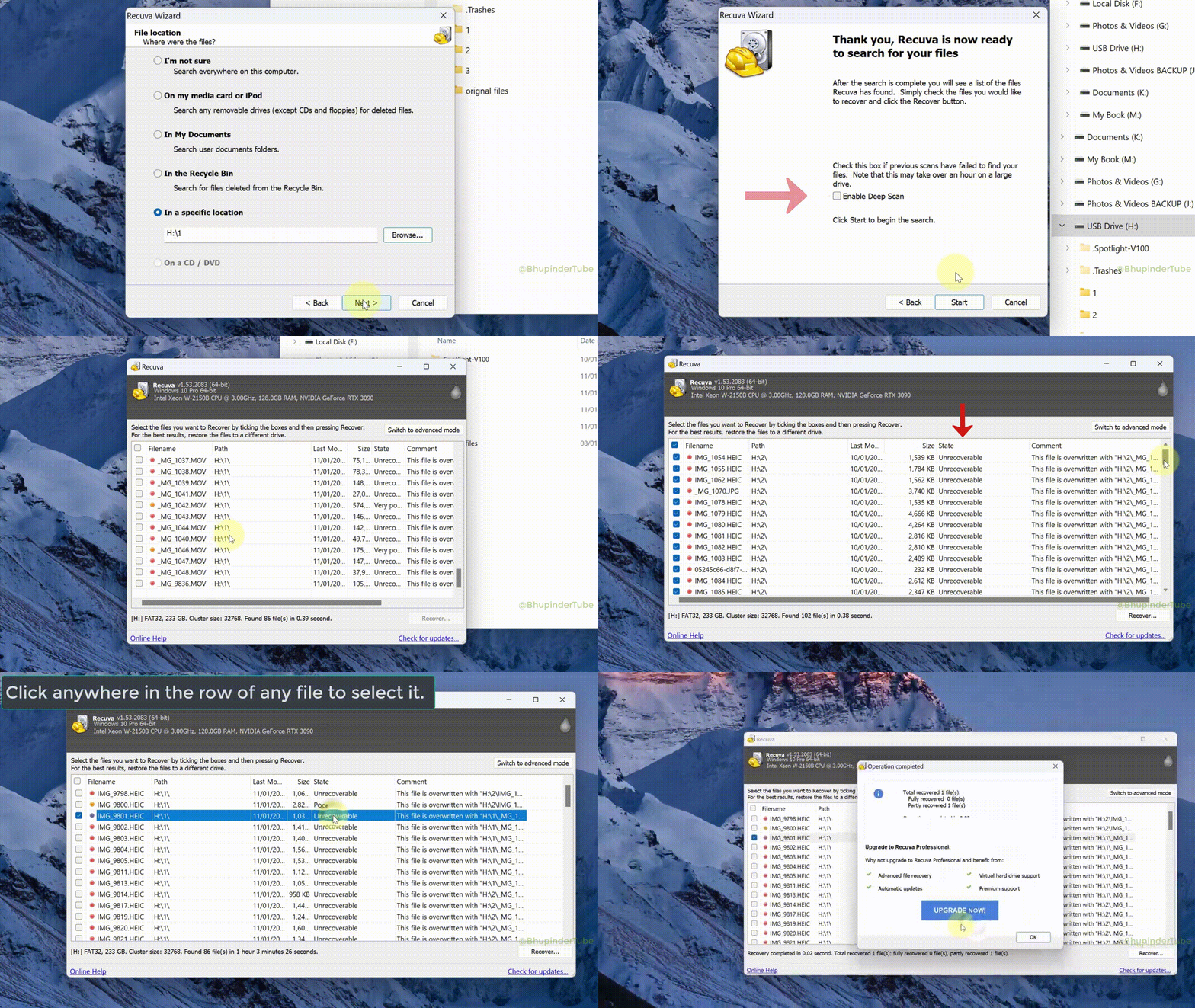
Recuva walks you through drive selection, scan options, and a sortable list of candidates. Progress and elapsed time tell you whether to wait or come back later.
- Path and filename columns help you tell a real document from noise when the name was lost.
- State labels summarize how likely a block is still intact; treat them as guidance while you verify.
- Preview is not universal; a bad preview does not always mean the file is gone.
- Size and modified date (when shown) help you match a deep-scan candidate to the file you remember—even when the name is a random string.
- Progress and ETA are rough; USB bridges and bad sectors can stall percentages. Note the elapsed time if you need to resume or compare runs.
Labels and layout change slightly between versions. When in doubt, match what you see to the capabilities page and your own notes before you recover hundreds of files at once.
04 · Safety
Do this · Avoid that
Small mistakes after deletion erase more data than the original delete. Use this as a checklist before you leave the keyboard.
Prefer
- Image or clone failing disks before endless retries.
- Download only from sources you would trust with your OS image.
- Verify a few recovered files before you batch-restore everything.
- Keep a paper trail: which disk, which scan mode, where files landed.
- Unmount or safely eject the sick card or stick before you move the PC—fewer surprise writes from autoplay or indexing.
- Confirm the recovery destination has headroom for the whole run before a deep scan; a full disk mid-copy can truncate the only good copy you find.
Avoid
- Installing recovery tools onto the same partition you are trying to save.
- Running “optimizer” or cleaner apps while a scan is in progress.
- Trusting mirror sites with extra bundled installers or odd filenames.
- Assuming one green flag in the list means the wedding photos are definitely back.
- Letting backup software “reconcile” or reformat the volume you are still hoping to carve—pause jobs until recovery is done.
Detour · Parallel rescue
Copies that skip undelete
Sometimes the file never depended on carving free clusters. Checking built-in Windows history and cloud trash first can save hours—and avoids another write pass on a tired disk.
Previous Versions & File History
Right-click the parent folder → Properties → Previous Versions when shadow copies exist. If File History targeted that library, restore from the dedicated drive before you commit to deep scan.
Cloud trash & version history
OneDrive, Google Drive, Dropbox, and iCloud for Windows often keep online recycle bins or file versions. Sign in from a browser, recover there, then copy down—undelete on disk is Plan B if the sync already removed local bytes.
Phones, tablets, and messaging
Photos may still live in the camera roll, vendor cloud, or chat backups. Ask whether the “lost” file was ever fully downloaded to the PC you are scanning—mobile galleries and email attachments beat fighting TRIM on the wrong device.
When any of these paths work, copy the good files to a neutral disk before you experiment further. For messy real-world threads, the תרחישים page groups SD cards, installers, and SSD limits in one place.
06 · Decision aid
איזו סריקה לנסות קודם?
זהו מפה גסה, לא הבטחה. מצב הכונן, ההצפנה ומשך הזמן מאז המחיקה חשובים יותר מכל שורה בטבלה.
| מה קרה | התחילו כאן | אם זה חלש |
|---|---|---|
| קובץ בפח המחזור או נמחק לפני דקות | אשף או סריקה מהירה על אותו נפח | סריקה עמוקה; השאירו את המחשב בשקט בזמן הריצה |
| מחיקה עם Shift או ריקון פח המחזור | סריקה מהירה על אותה אות כונן | סריקה עמוקה; מיון לפי סוג ותאריך אם מוצגים |
| כרטיס SD או USB שמבקש פרמוט | הפסיקו להשתמש בכרטיס; סריקה עמוקה מקורא שולחני | ראו תרחישים להערות על קוראים ודימות |
| המחיצה נראית ריקה, RAW או בגודל שגוי | סריקה עמוקה אחרי בדיקת כבלים ויציאות | דמות תחילה אם הדיסק נופל או מרעיש |
| SSD פנימי (נייד או NVMe בשולחן עבודה) | סריקה מהירה, ואז עמוקה אם הקבצים חשובים | צפו במגבלות TRIM; SSD ו־TRIM מסביר למה |
| הקובץ היה רק בתיקייה מסונכרנת לענן | בדקו תחילה את הפח או היסטוריית גרסאות באתר הספק | סריקה מקומית עוזרת רק אם עותק מלא היה על הדיסק; ראו יכולות למגבלות נתיבים |
| דיסק וירטואלי (.vhdx / .vmdk) על כונן מארח תקין | סרקו את נפח המארח או חברו את הדימות לקריאה בלבד, ואז התמקדו במערכת הקבצים של האורח | צילומים ודיסקים משתנים משנים מה פירוש „מחוק״ — בדקו את מנהל המכונות הווירטואליות לפני שאתם סומכים על מערכת האורח בלבד |
נפחים מוצפנים חייבים להיות פתוחים ב־Windows לפני ש־Recuva רואה משהו שימושי. BitLocker, מדיניות ארגונית והצפנת חומרה כושלת יכולים לתת סריקה ״ריקה״ גם כשהדיסק מסתובב.
Formats · Honest expectations
Not every file type behaves the same
Recuva reads disks, not application magic. Some formats survive a partial overwrite better than others; some need every cluster in order. This is a practical lens, not a guarantee for your specific case.
Photos & simple video
JPEG, PNG, and many phone clips have clear headers; deep scan often finds them even when names are gone. Very large or fragmented 4K files may recover with glitches—always open the result in a real player.
Office, PDF, text
DOCX and XLSX are ZIP-like inside; a single bad sector can make Word refuse the whole file. Plain .txt and many PDFs tolerate rough recovery better. Save a recovered copy under a new name before you let Office “repair” it in place.
Databases & mail stores
SQLite, Outlook PST/OST, and similar monoliths need internal consistency. You might recover a file that mounts but throws errors—export what you can immediately and keep the raw recovered file as a second backup.
Archives & VMs
ZIP and disk images tie many pieces together; one missing chunk can break the whole archive. Test with 7-Zip or your hypervisor’s “verify” option. Partial VMDK/VHD recovery is still worth attempting if the alternative is total loss.
Mixed folders are normal: recover a sample of each type you care about before you queue hundreds of files. For edge cases, pair this with after recovery and support angles.
07 · Audience
Who this site is written for
You do not need to be in IT. You do need patience, a second disk for recovered files, and a healthy dislike for “one click fixes everything” marketing.
Home & family
Photos, school folders, and “I emptied the Bin by accident” moments on a single Windows PC.
Students
Laptops with one internal drive, USB sticks between classes, and tight deadlines when deep scans feel too slow.
Small offices
Shared folders, external backup disks, and the occasional “finance drive looks empty” panic before payroll.
Friends-of-IT
You are the person everyone texts first. You want a sane script to hand them before they install random tools.
08 · From the blog
קריאות ארוכות ששוות את הזמן
המאמרים חורגים מהתקציר בדף הבית: מתי לעבור לסריקה עמוקה, איך לטפל בכרטיסים שבירים, ומה TRIM אומר לשחזור ב־SSD.
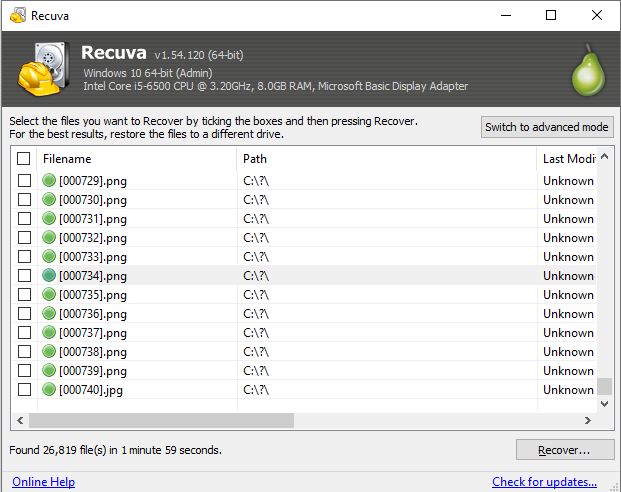
מתי להריץ סריקה עמוקה
מצב מהיר כשמערכת הקבצים עדיין מציגה מחיקות; עמוק כשלא. צפו לזמן ולשמות גנריים.
מדריך המשך קריאה
כרטיסי SD: להגן לפני הסריקה
הפסיקו להשתמש בכרטיס; קורא איכותי; שחזרו לדיסק במחשב, לא חזרה לכרטיס.
מדריך המשך קריאה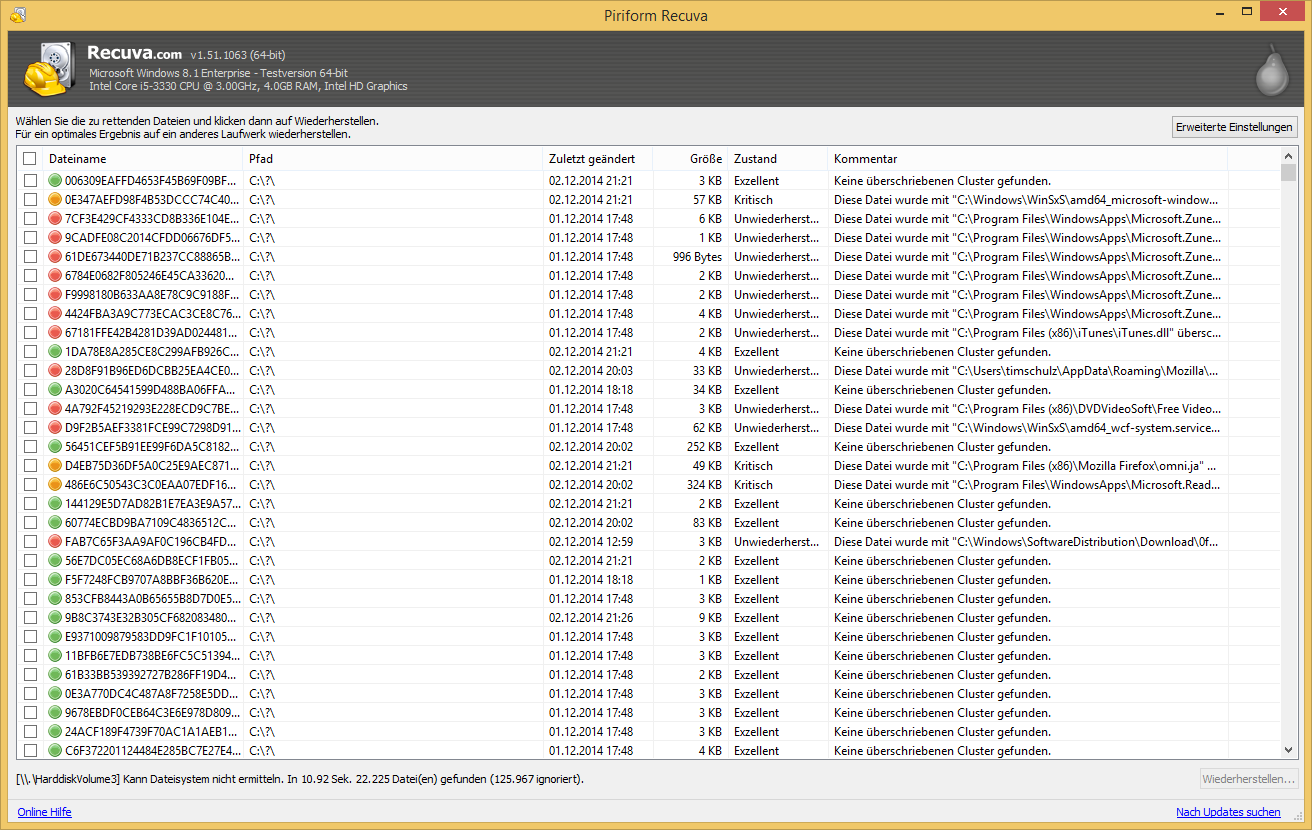
SSD ו־TRIM
SSD פנימיים לעיתים משחררים בלוקים מהר. גיבויים וצלליות הם רשת הבטיחות האמיתית.
מדריך המשך קריאה09 · Terms
Words you will see everywhere
Plain-language anchors so marketing pages and forum threads are easier to parse.
- שחזור מחיקה
- ניסיון להחזיר קובץ שרשומת התיקייה או האשכולות שלו עשויה עדיין להתקיים לפני שכתיבה חדשה דורסת אותם.
- סריקה מהירה
- משתמשת במטא־דאטה של מערכת הקבצים כשעדיין עקבית. מהירה, אבל עיוורת לנתונים שרק חתימות קבצים מגלות.
- סריקה עמוקה
- קוראת את הנפח יותר כמו מגזרים גולמיים ומתאימה כותרות קבצים מוכרות. איטית יותר, עם יותר תוצאות כוזבות ושמות גנריים.
- TRIM
- תכונת SSD שמסמנת לכונן אילו בלוקים ניתנים למחיקה. מצוינת למהירות, קשה לשיעורי הצלחה של שחזור מחיקה קלאסי.
- אשכול
- יחידת האחסון הקטנה ביותר שקובץ יכול לתפוס. דריסה חלקית בתוך אשכול עלולה לפגוע בחלק מהקובץ.
- פח המחזור
- אזור אחזור ב־Windows שמאחזק חלק מהמחיקות עד שמרוקנים אותו או שמדיניות מנקה אותו אוטומטית.
10 · Install paths
Installer versus portable: what changes?
Both builds can run the same scans. The difference is how much they touch your system disk and how easy it is to run from a USB stick when Windows is unstable.
Standard installer
- Familiar “next, next” flow on a healthy PC.
- Watch the screen for optional offers; uncheck anything you did not intend to add.
- Always verify the installer’s digital signature after download, before you run the file.
Portable build
- Unpack to a flash drive or second volume when C: is the disk you need to scan.
- Reduces new writes on a sick system disk compared with a full install.
- Handy for “one-off” recoveries on someone else’s laptop without leaving shortcuts behind.
Whatever you choose, download only from a vendor or mirror you trust. If the filename, size, or signature looks off, delete it and try again from a different channel.
11 · Limits
When to stop clicking “scan again”
Free tools help many people, but hardware failure, encryption without keys, and RAID mistakes need different tooling and sometimes a clean-room lab.
Pause DIY if you see this
- Clicking, beeping, or disappearing drives in Disk Management. Power down; repeated power cycles can destroy platters.
- RAID arrays or NAS boxes where more than one disk failed. Cloning the wrong member makes pro recovery harder.
- Full-disk encryption without your password or recovery key. Software cannot guess keys for you.
Still worth trying at home
- Accidental delete on a drive that sounds healthy and stays online.
- Formatted the wrong USB stick once, then unplugged it.
- סריקה עמוקה מציגה מועמדים אבל התצוגות המקדימות נראות מוזרות; שחזרו דוגמה ופתחו באפליקציה האמיתית.
12 · Layout
Filesystems Windows keeps throwing at you
Recuva cares about how the volume is organized, not the sticker on the box. These one-liners explain what most home users actually run into.
NTFS
Default on internal Windows disks. Journaling helps metadata survive abrupt shutdowns; still not magic after heavy overwrites.
FAT32
Common on smaller or older flash. Remember the 4 GB per file limit when you wonder why a video “vanished.”
exFAT
Large SD cards and drives shared with Macs. Often what a camera formats by default today.
ReFS
Shows up on some servers and advanced setups. Expectations for classic undelete differ; backups matter more.
If Windows offers to format a drive you still need, say no, then read the תרחישים page before you let any tool rewrite the partition table.
13 · Field notes
Patterns we hear in real support threads
Composite stories, not testimonials. They show how small choices after a delete change the outcome.
„הכרטיס נראה ריק אחרי ניתוק גרוע. סריקה עמוקה ארכה נצח על לפטופ ישן, אבל רוב תיקיית הטיול חזרה עם שמות מוזרים.“
“Every mirror added toolbars. I grabbed the portable build from a vendor I already trusted and recovered to an external HDD.”
“The laptop SSD showed almost nothing recoverable. TRIM had already cleaned blocks. Cloud backup saved the thesis.”
14 · After recovery
After files land on the safe disk
Getting bytes off the sick volume is only half the job. A calm verification pass saves you from celebrating a corrupted wedding video or a zero-byte “document.”
פתחו in the real app
Launch photos in a viewer, documents in Office or LibreOffice, archives with 7-Zip. Thumbnails and Recuva’s preview pane can lie.
Copy, then back up
Move verified files to a second location: another drive, NAS, or cloud you control. Keep the recovery folder until you are sure.
סריקה if it lived on the web
If the disk ever ran unknown installers or dodgy downloads, let Windows Defender (or your AV) look at the recovered folder before you merge it into clean projects.
15 · Background noise
Quiet the PC while you scan
Every background writer competes with recovery. Pausing them is not superstition; it is fewer overwrite chances on a crowded disk.
You do not need to uninstall anything. Exit or pause the heavy hitters for the hours a deep scan might run, then turn them back on when you are done verifying files.
- OneDrive, Dropbox, Google Drive, iCloud for Windows — pause sync or exclude the scanned volume until recovery finishes.
- Steam, Epic, Battle.net, Xbox app — updates and shader caches write large patches to disk; close launchers during fragile scans.
- Browsers and IDEs — heavy downloads, dev servers, and Docker volumes can touch the same SSD you are trying to read.
- Windows Update — if a feature update is pending, consider postponing it until after you have copied recovered data somewhere safe.
- Backup jobs — Macrium, Veeam agent, File History, and “smart backup” suites can rewrite large chunks of the volume they protect. Pause or reschedule until recovery is finished.
- Scheduled AV and “quick” scans — full-disk sweeps and aggressive real-time hooks touch the same sectors you are hoping to read cleanly. Snooze heavy scans for the window you need.
16 · Reality
מיתוסים שעדיין מופיעים בתוצאות חיפוש
בדיקות מציאות קצרות כדי שלא תבזבזו לילה על הבטחה שפיזיקת האחסון לא יכולה לקיים.
| מיתוס | מה באמת קורה |
|---|---|
| „סריקה עמוקה קוראת כל בייט בצורה מושלמת.“ | זהו ניסיון מיטבי עם תוצאות כוזבות. עדיין שופטים כל קובץ בפתיחה. |
| „תוכנה בתשלום תמיד מנצחת חינמית.“ | מחיר לא משנה TRIM או התרסקות ראש. לפעמים הנתונים פשוט נעלמו. |
| „קירור הכונן מתקן מגזרים פגומים.“ | טריקי טמפרטורה שייכים לפולקלור פורומים ישנים. קור יוצא דופן עלול להוסיף סיכון לליחות. |
| „פח המחזור שומר הכל לנצח.“ | מדיניות, מכסות דיסק ומחיקה עם Shift עוקפים אותו. ריקון הפח לעיתים סופי לשחזור מהיר. |
| „אחוז מאה הבטחה לשחזור.“ | התייחסו לביטוי כשיווק. אף מעבדה כנה לא מבטיחה עץ קבצים מלא אחרי דריסות כבדות. |
להיקף רישוי ולמה האתר הזה לא עושה, ראו שאלות נפוצות.
17 · Snippet
שאלות שפותחים קודם
תשובות קצרות כאן; דף השאלות הנפוצות מעמיק ברישוי, בהבטחות ובשמות קבצים אחרי סריקה עמוקה.
האם Recuva בחינם?
שכבה חינמית מוצעת זמן רב לשחזור אישי. לשימוש מסחרי, אמתו את הרישיון הנוכחי מול הגרסה שמתקינים. התנאים עשויים להשתנות בין מהדורות.
האם אפשר להבטיח שחזור?
לא. התוצאה תלויה בהיסטוריית דריסות, במצב הכונן, במערכת הקבצים וב־TRIM ב־SSD. התייחסו לתוויות סטטוס כרמזים עד שפותחים את הקובץ המשוחזר באפליקציה האמיתית.
למה שמות קבצים נעלמו אחרי סריקה עמוקה?
רשומות התיקייה לעיתים אינן קיימות; הסריקה העמוקה בונה מחדש מחתימות קבצים. הנתונים עשויים לשרוד עם שם גנרי, גודל ונתיב חלקי. זה צפוי, לא סריקה כושלת.
הורידו עכשיו
האתר אינו מארח מתקינים. חפשו Recuva ל־Windows ומקור מהימן, או עמוד המפרסם. תנו ל־SmartScreen ולבדיקת חתימה להסתיים לפני הרצת הקובץ.
הורידו עכשיוכש־JavaScript פעיל, הכפתור מקבל קישור ישיר חדש בכל טעינה; בלעדיו נשאר קישור המפרסם הרשמי.