
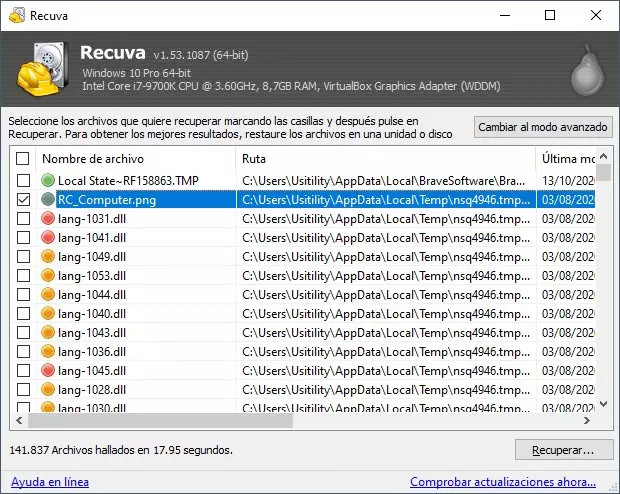
Deep scans are thorough, which is both the feature and the bug: they will happily list thousands of tiny artifacts from browser caches, temporary installers, thumbnail databases, and crash logs. None of that noise means your thesis is gone—but it can hide the real signal if you do not filter aggressively.
This article is a practical guide to cutting noise without missing real user files: path heuristics, size bands, time windows, and export habits that keep you moving instead of drowning.
Start with the user’s real folders
Most “I lost my project” stories still live under predictable roots: Documents, Desktop, Downloads, source repos under Documents\GitHub, or company-standard folders. Filter by path fragments that match those roots before you scroll random %TEMP% entries.
Use time and size as coarse filters
If the user knows they edited the file yesterday afternoon, sort and scan around that window. If they know it was a 120 MB video, ignore 200 KB “matches” unless you have a reason to believe the file was truncated. Filters are not perfect, but they reduce cognitive load when the list is huge.
- Collapse duplicate-looking thumbnails: same extension and tiny sizes are often junk.
- Watch for browser profile paths—Chrome/Firefox caches are noisy on personal PCs.
- If the user uses Docker/WSL, paths can look unfamiliar—ask what stack they ran that day.
Export discipline: small batches, early opens
Exporting 50 plausible files beats exporting 5,000 “just in case.” Opening early catches wrong picks before you fill the destination disk and create a second crisis. Keep a simple spreadsheet of candidate IDs, sizes, and outcomes if the case spans multiple days.
When noise is actually the target
Sometimes the user’s “document” was only ever a temp export—think cached PDFs or downloaded CSVs from a web app. In those cases, cache paths become relevant. Ask how the file was created; the story drives the path filters.